
Avast Home Edition
- Details
Instead of Avast I would recommend Microsoft Security Essentials (friendlier for an ordinary user).
I have installed this antivirus for a lot of people, but unhappily it has to be registered again every year. So I decided to write up a short set of instructions.
Step 1. Getting the code
To extend the registration you have to fill in and submit the registration form:
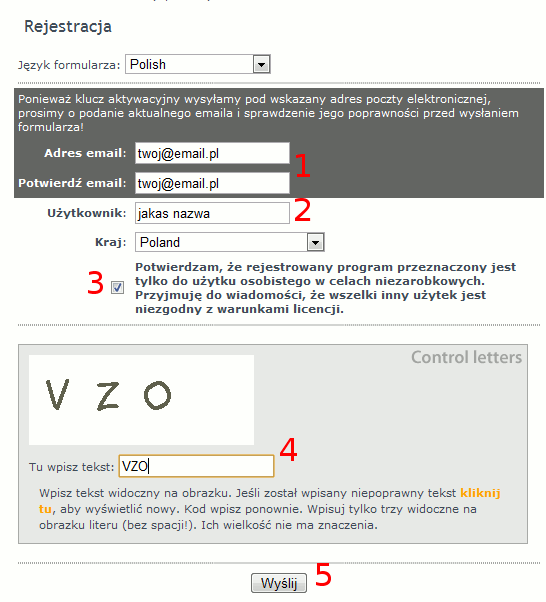
In field 1 you type twice the e-mail address the registration code should be sent to. In field 2 you put some sort of name - your first name, your surname, a nickname, anything at all. You have to tick box 3 and copy the three letters from the image into field 4. Then you click button 5. The registration code should arrive within a quarter of an hour or so.
Step 2. Entering the code into the program.
On the Avast website there is a video showing how to read the code out of Outlook Express and then how to enter it into Avast.